


I used to spend entire weeks building a single training module. Recording voice, editing footage, fixing slides- it was extremely exhausting. Then I found an AI platform that changes everything.
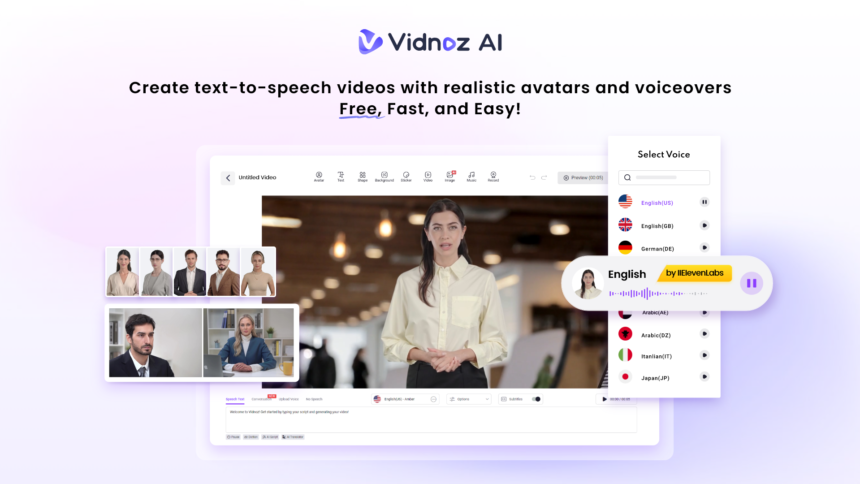
Vidnoz AI is a free AI-powered video creation platform built for people like me who need results fast. It is certified with ISO/IEC 27001:2022 for Information Security Management, so I felt safe uploading work-related content right away.
Here is exactly how it changed the way I build training materials.
Why Trainers Burn Out on Video Production
Let me be honest. Most of us did not get into training to become video editors. We got into it to teach. But somewhere along the way, the tools took over, and the actual teaching got buried under timelines and export settings.
Before Vidnoz AI, my workflow looked something like this:
- Write the script
- Record audio (multiple takes)
- Find stock footage or record on camera
- Sync audio to visuals
- Export and upload
- Repeat for every single module
That process could eat up three to five days per video. With Vidnoz AI, I now finish the same work in a day or less.
Key Features That Matter for Trainers
Here is what I discovered after spending real time with the platform. These are not just features on a spec sheet. They are tools I use every week.
-
1900 Plus Lifelike Avatars for Every Training Context
The avatar library alone is worth talking about. Vidnoz AI gives you access to over 1900 lifelike avatars drawn from different industries and roles. Whether I am building a course on customer service or workplace safety, there is always an avatar that fits the scene.
What I appreciate most is the flexibility. The options include:
- Digital twin avatars that replicate your own likeness
- Expressive avatars that show natural emotion and movement
- Product avatars designed for demos and walkthroughs
I no longer have to get in front of a camera on days when I just want to focus and create. The avatar does the presenting while I focus on the content.
-
2000 Plus AI Voices Across 140 Languages
Once you have seen the voice options, you will not go back to recording in a quiet room. Vidnoz AI offers over 2000 natural-sounding AI voices in more than 140 languages. The voices are powered by ElevenLabs, Microsoft, and Google, so the quality is genuinely impressive.
For my global training programs, this feature is a game-changer. I can produce the same module in three different languages without hiring a single voice actor. The lip sync is tight, and the delivery sounds human, not robotic.
-
2800 Plus Pre-Designed Video Templates
Starting from scratch is where most of my time used to go. Now I pick from over 2800 pre-designed video templates that are already formatted for training contexts. Onboarding compliance, soft skills, and product knowledge- there is a template for nearly everything.
I open a template that fits my topic, and my structure is already there. All I have to do is swap in my content.
-
Free Daily Use With No Pressure
Every user gets 30 credits of free video generation per day. For someone just exploring the platform, that is more than enough to run a test and see real results. When I first started, I used those two minutes to build a quick demo module, and I was sold within the first session.
The free tier removes any excuse not to try it. There is no credit card required and no timer ticking on a trial period.
How to Create a Training Video With Vidnoz AI
This is the part I want every trainer to read. The process is simpler than you think.
Step 1: Choose a Template and Avatar
Start by browsing the template library and picking one that matches your training goal. Then choose your avatar. I pick one that visually matches the industry context of my course. A financial compliance module gets a professional avatar. Retail training makes someone more approachable.
Step 2: Create Your AI Voiceover
Paste your script into the voiceover tool and select a voice. You can filter by language, accent, and tone. I usually run a short preview before committing. The ElevenLabs voices in particular sound remarkably natural during longer passages.
Step 3: Add Your Custom Touch
This is where I personalize the video. I upload my company logo, drop in relevant images, and adjust colors to match our brand. You can also add text overlays, captions, and transitions. The editor is drag-and-drop, so no technical skills are needed.
Step 4: Generate the AI Video and Share
Hit generate, and within minutes, the video is ready. I can download it directly or share it via a link. For learning management systems, the download option works perfectly. I drop the file into our LMS, and the module is live.
What 50% Time Savings Actually Looks Like
Before Vidnoz AI, a five-module course took me about three weeks to produce. Now I finish the same scope in ten days or less. That is not an estimate. That is what I tracked over three consecutive projects.
The time I save goes back into writing better content, doing more research, and honestly taking a breath. The quality of my training went up because I stopped spending so much energy on production.
Final Thoughts
If you are a trainer and you have not tried Vidnoz AI, I genuinely encourage you to start today. The free daily access means you can build something real without spending a single dollar. The avatar library, the voice engine, and the template collection are all mature enough to handle professional training work without compromise.
I went into it skeptical. I came out with a faster workflow and better-looking content than I had been producing with far more effort. That is the kind of tool worth talking about.
Try Vidnoz AI Video Generator and see what your first video looks like. You might be surprised how quickly it all comes together.