


You’ve just installed the latest blockbuster game. The graphics look stunning in the trailer. You hit “Play”… and then it happens. Stuttering. Lag. Frame rates that drop so low you feel like you’re watching a slideshow instead of playing a game.
Sound familiar? You’re not alone. In 2026, even powerful gaming PCs can struggle with performance issues. But here’s the good news: in many cases, the problem isn’t your hardware. It’s your drivers.
The Hidden Performance Killer Most Gamers Ignore
Let’s start with a hard truth: outdated drivers are one of the leading causes of poor gaming performance. Your graphics card, network adapter, audio chip, and motherboard all rely on drivers to communicate with Windows. When those drivers are outdated, missing, or corrupted, your system simply cannot perform at its full potential.
Microsoft itself admitted in May 2026 that Windows Update has been quietly downgrading graphics drivers, leaving gamers and content creators watching their performance vanish overnight. Gaming rigs lose performance, and even premium devices suddenly struggle with tasks they handled smoothly before. Windows updates like KB5074109 have been reported to cause 15–20 FPS losses in certain titles, along with microstuttering and brief freezing phases that severely impair the gaming experience.
The problem is real. And it’s widespread.
Step One: Rate Your PC
Before you can fix a problem, you need to understand where your system actually stands. That’s where a good PC performance assessment comes in.
Imagine being able to check exactly how many games your computer can run, and at what quality settings. No more guessing whether your system meets the minimum requirements. No more buying a game only to discover it’s unplayable on your machine.
A dedicated rate my PC tool does exactly that. IObit’s Rate My PC analyzes your processor, graphics card, and RAM against a database of thousands of popular games to calculate compatibility scores. It tells you which games your PC can run, and at what settings, giving you a clear picture of your system’s gaming capabilities.
Here’s how it works: open Task Manager with Ctrl+Shift+Esc, go to the Performance tab, and note your CPU, RAM, and GPU details. The tool then compares your specs against real-world game requirements and provides a straightforward rating. No signup required. No complicated setup. Just a clear answer: Is your PC ready for the games you want to play?
Step Two: Test Your FPS
Knowing your PC’s game compatibility is one thing. But what about real-world performance? How many frames per second can you actually expect in your favorite titles?
That’s where an FPS test comes in. IObit’s FPS Calculator is a fast, free tool that estimates in-game frame rates based on your CPU and GPU. Simply select your processor, graphics card, resolution, and game settings, and the tool provides accurate performance predictions.
The results are easy to understand: below 30 FPS is generally unplayable, 30–60 FPS is playable but not smooth, 60–144 FPS delivers smooth gaming, 144–240 FPS offers excellent high-refresh-rate performance, and 240+ FPS is elite competitive territory. The tool also provides detailed breakdowns including 1% lows and 0.1% lows, critical metrics that reveal whether your system suffers from frame drops during intense moments.
Whether you’re a competitive gamer chasing every frame or a casual player who just wants smooth, enjoyable gameplay, an FPS test gives you the data you need. No signup required. No downloads. Just fast, accurate performance predictions.
Step Three: Update Your Drivers
Now comes the most important part. You’ve rated your PC. You’ve tested your FPS. And perhaps you’ve discovered that your system isn’t performing as well as it should. What now?
The answer is surprisingly simple: update drivers .
IObit’s Driver Booster is specifically designed to help users identify outdated drivers and install the latest versions quickly. It detects and updates old drivers automatically, supporting over 18 million drivers and game components. With a simple one-click scan, you can quickly update drivers, restore stability, and keep your PC performing at its best.
Here’s what makes Driver Booster particularly effective for gamers:
Game-Ready Driver Updates – Driver Booster detects and installs the latest gaming drivers for NVIDIA GeForce and AMD Radeon graphics cards, ensuring you have the optimizations needed for the latest titles. Specific drivers can be updated to optimize specific games.
Game Boost Mode – The built-in Game Boost feature fine-tunes your system for up to 5% better performance, reducing lag and delivering smoother gameplay. It optimizes your PC for gaming with a single click.
Safety First – Before installing any driver, Driver Booster creates a system restore point. If something goes wrong, you can roll back instantly. Every update goes through Microsoft WHQL and an IObit security scan, ensuring that drivers are both safe and reliable.
Expanded Device Support – Driver Booster 13 introduced breakthrough support for Windows 10/11 ARM64 devices, covering more than 100,000 ARM drivers and growing. It fully supports Windows 11, 10, 8/8.1, 7, XP, and Vista.
Faster, More Reliable Updates – The refined installation engine works 8% faster and achieves a remarkable 57% higher success rate, taking the hassle out of updates.
The Results Speak for Themselves
Gamers who use Driver Booster consistently report noticeable improvements. After updating drivers, FPS often increases, stuttering decreases, and the overall gaming experience is enhanced. Common frustrations, such as audio dropouts during video calls or screen freezes in the middle of a game, are often caused by outdated, missing, or corrupted drivers. Driver Booster addresses these issues directly.
For competitive gamers playing titles like Valorant or Call of Duty: Warzone, squeezing an extra few frames per second out of your PC can make the difference between matches won and lost. Driver Booster delivers exactly that kind of performance edge.
A Simple Routine for Peak Performance
Here’s a simple three-step routine that every PC gamer should follow:
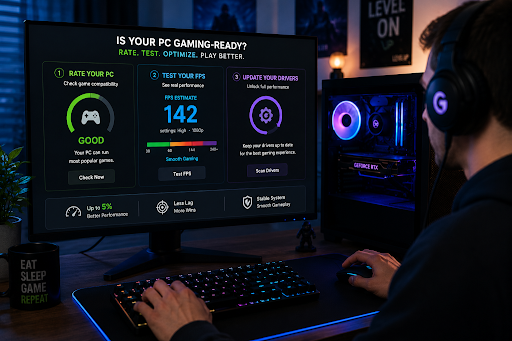
- Rate your PC to understand your system’s gaming capabilities.
- Test your FPS to see real-world performance expectations.
- Update your drivers with Driver Booster to unlock your system’s full potential.
Together, these three steps give you a complete picture of your PC’s gaming performance, and a clear path to improvement.
The Bottom Line
Your gaming PC has more potential than you might realize. Outdated drivers are quietly holding back your performance, causing stuttering, lag, and frustrating FPS drops. But with the right tools, you can diagnose the problem and fix it in minutes.
IObit’s Rate My PC and FPS Calculator give you the insights you need to understand your system. And Driver Booster delivers the driver updates that unlock smoother, more stable, and more enjoyable gaming.
Give your PC the care it deserves. You’ll notice the difference from the very first match.