


So I decided to test it myself and write an honest review. I will share my real experience using Game Booster. You will learn how it works, what I liked, what bothered me and whether it is safe. I will also walk you through simple setup steps so you know if this tool deserves a spot on your PC.
What Is Smart Game Booster
Smart Game Booster is an optimization tool built specifically for PC gamers. It combines hardware boosting, network acceleration and security checks in one app. It frees up system resources and improves your connection so games run smoother. iTop Inc built it for people tired of stutters and laggy matches.
Is Smart Game Booster Safe to Use
This was honestly my biggest worry before downloading anything new and unfamiliar. I scanned the installer with my antivirus first and it came back clean. It also does not ask for unusual permissions during setup. It only needs access to system processes and network settings to do its job.
I ran it for weeks without crashes or strange background activity. My firewall did not flag suspicious connections either. Based on my testing, Smart Game Booster behaves like a normal optimization tool. Still, download software only from the official website to avoid fake copies.
One Click Dual Optimization
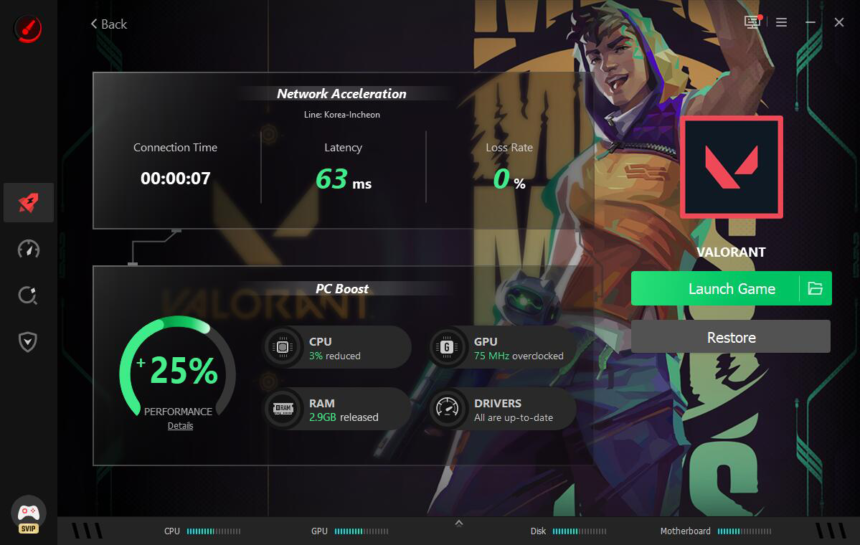
One feature that stood out most is one click dual optimization. With a single click it boosts hardware performance and network speed together. Most tools only handle one side of the problem. This one tackles frame drops and high ping at once, saving manual tweaking.
Key Features at a Glance
- Global Network Acceleration: 500+ worldwide game servers deliver low-latency, high-bandwidth connections and smoother cross-region gameplay
- Lag & Ping Reduction: Dedicated game lines help cut latency, reduce packet loss, and avoid peak-hour congestion
- Enhanced Performance Boost: GPU and VRAM optimisation can improve PC performance by up to 30%
- One-Click & Auto Boost: Disables unnecessary background apps and automatically activates gaming mode when a game launches
- Upgraded “Can I Run It” Tool: Fast compatibility checks across 160,000+ games, 3,000+ GPUs, and 9,000+ CPUs
- Security & Real-Time Monitoring: Built-in protection with live hardware temperature and usage tracking
Pros of Smart Game Booster
Here is what impressed me during testing.
- Easy to use even for beginners
- Built-in compatibility checker for thousands of games and GPUs
- One-click optimization that handles both hardware and network without needing two separate tools
- The built-in customizable overlay can track live FPS, CPU/GPU temperatures, and usage rates without leaving the game.
- Safely overclock the GPU and VRAM for a risk-free performance upgrade.
Cons of Smart Game Booster
No tool is perfect, and I want to be honest about the downsides too.
- Some advanced features require a paid plan.
- Initial scan can take a few minutes on older PCs.
- Network acceleration results vary depending on your region.
- A few background processes run even after closing the app.
These are not deal-breakers but worth knowing before you commit.
How to Use Smart Game Booster
Getting started took me less than five minutes. Here are the steps I followed.
Step 1. Open Smart Game Booster. After downloading and installing it, launch the program on your Windows PC.
Step 2. Choose a game to boost. Pick the game you want to optimize. It optimizes the CPU, GPU, RAM, and internet connection at the same time.
Step 3. Enjoy high FPS and low-ping gaming. I noticed up to an 118 percent FPS boost and 79 percent lower ping during testing.
That is really all it takes. No complicated settings or technical knowledge needed.
My Real Experience With Game Booster
I first tried this tool during a late-night Valorant session when my ping kept spiking. After running the boost, my connection felt steadier. Frame drops during fights also reduced. I am not saying it works like magic for every setup, but the difference felt real.
I also liked the temperature monitor. It warned me once when my GPU ran hotter than usual. That kind of feedback gives peace of mind during long gaming sessions.
Should You Trust This Tool
Based on weeks of use, I did not encounter malware, hidden trackers, or unwanted toolbars. iTop stays transparent about what each feature does. Other users online mostly echo my experience, praising the network acceleration with complaints limited to pricing.
If you are still unsure, start with the free version. Test it on your own games before deciding to upgrade.
Final Verdict
So is Smart Game Booster safe to use? From my testing, yes, it is. It performed as advertised without putting my system at risk. Its pros, like easier setup and dual optimization, outweigh the minor downsides for most gamers.
If lag and high ping have been ruining your matches, this tool is worth a try. Download Game Booster from the official source and see the difference for yourself.